Affiliate marketing on pinterest works when you claim your site, pin to original content or clean affiliate links, disclose with a tag like #ad or (paid link), keep one authentic account, and scale only tracked winners.
Quick Steps: Affiliate Pins That Stay Live
Pinterest allows affiliate links. What it punishes is spam, hidden redirects, duplicate accounts and pins whose image promises something the landing page never delivers.
- Switch to a free Pinterest business account and claim the domain you publish on.
- Turn on Rich Pins so your titles and descriptions pull from your own page metadata.
- Pick three to five products you can genuinely describe, then build pin titles around phrases people type into the Pinterest search bar.
- Link each pin either to a clean affiliate URL with your tracking ID intact or to your own review post — never to a shortener Pinterest blocks.
- Put a plain disclosure in the pin description and on the landing page, then check clicks weekly and kill anything that gets saves but no outbound clicks.
Each step below adds the settings, the wording and the trade-offs. Budget about two hours for the one-time setup, then roughly 30 minutes per batch of pins. The sections after Step 5 give you a pre-publish checklist and the suspension traps that catch new affiliates.
Why Pinterest Is Worth Your Time — And What Gets Affiliates Banned
Pinterest behaves like a visual search engine with a shopping habit. People arrive planning a kitchen remodel, a capsule wardrobe or a toddler’s birthday, which means commercial intent is already in the query. Pins also keep surfacing months after you publish, unlike a feed post that dies in a day.
The platform’s commercial scale backs this up. Pinterest, Inc. reported full-year 2024 revenue of $3,646 million, up 19%, in its Q4 and Full Year 2024 results press release filed with the SEC.
Bans rarely come from affiliate links themselves. They come from behavior the policy names directly: Pinterest’s Commercial and Branded Content Guidelines tell creators to operate only one Pinterest account, which should be their authentic presence on the platform. Running a "main" account plus five niche accounts to multiply reach is the fastest way to lose all six.
The second trigger is mismatch. If the pin image shows a $12 organizer and the link opens a generic storefront, users hide the pin and report it. Repeated reports feed distribution limits long before a human reviewer ever looks.
Treat Pinterest like a publisher treats a search engine. Original images, honest titles, one account, pages that load fast and deliver what the pin promised.
Step 1 — Set Up a Business Account, Claim Your Site, and Turn On Rich Pins
Time: about 45 minutes. You need: a Pinterest login, access to your site’s HTML head or DNS records, and a published page with product content on it.
Convert your personal profile to a business account inside Settings, or create one fresh. Business accounts unlock analytics, which you cannot run a serious affiliate operation without.
Next, claim your website. According to the Pinterest Help Center, claiming your website gives you data on how often your content is saved and attaches your profile picture and profile link to Pins saved from your site. That attribution matters: when a stranger saves an image from your review post, your face and profile ride along with it.
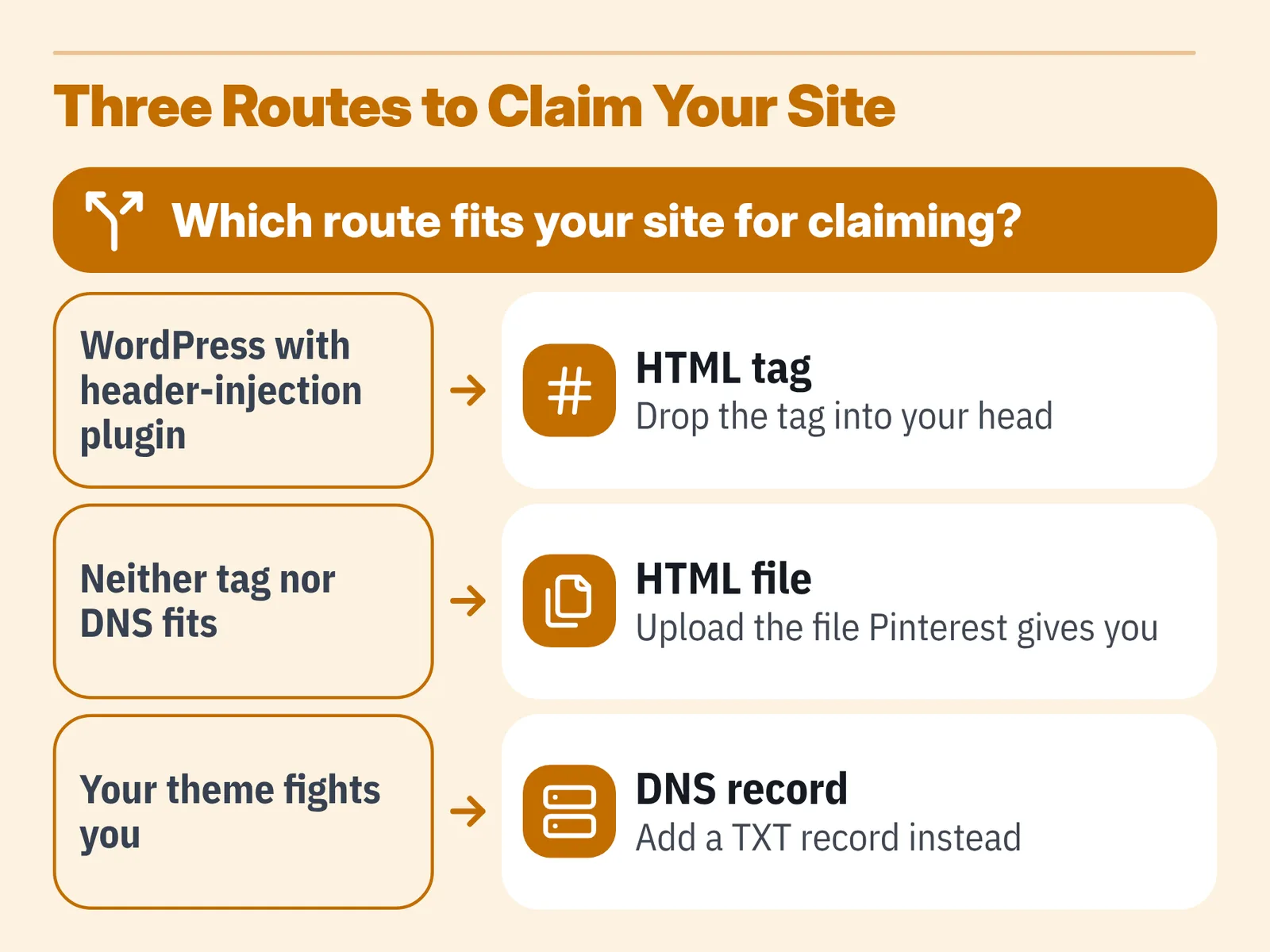
Claiming takes one of three routes — an HTML tag in your head, an uploaded HTML file, or a DNS TXT record. Use the HTML tag if you are on WordPress with a header-injection plugin. Use DNS if your theme fights you.
Then enable Rich Pins by validating a URL from your claimed domain. Rich Pins pull the title, description and author from your page markup, so an updated headline on your post updates the pin metadata instead of leaving stale text in front of searchers. If your pages already output Open Graph or schema markup, validation usually passes on the first try.
Finally, fill in your profile bio with what you cover and who you help. A profile that reads "gear reviews for small-kitchen cooks" outperforms a bare name.
Step 2 — Pick Products and Keywords Pinterest Searchers Are Already Looking For
Time: 60 minutes for your first list. You need: the Pinterest search bar, Pinterest Trends, and your affiliate dashboard’s top-selling categories.
Start inside the app, not in a keyword tool. Type a seed term like "small apartment storage" and read the guided search tiles that appear under the bar — those tiles are real queries Pinterest is willing to rank you for. Write down every tile, then repeat with each tile as the new seed.
The audience rewards consistency. According to Pinterest’s FY2025 annual report filed with the SEC, 62% of its monthly active users also visited the platform weekly as of December 31, 2025. People come back on a rhythm, so a board that gets three new pins a week stays visible in a way a one-time dump never will.
Score each product idea against three filters before you commit:
- Visual proof. Can one square or vertical image show the benefit? Shelf risers photograph well; a VPN subscription does not.
- Specific query. Does a real search phrase exist, like "under sink organizer rental kitchen"? Vague terms attract saves, not clicks.
- Price honesty. Can you describe the product accurately without quoting a price that changes weekly?
Pair this with the way you already choose topics for search — the same logic behind finding buyer-intent keywords for affiliate content applies here, because Pinterest surfaces text from titles, descriptions and board names.
Step 3 — Decide Where the Pin Links: Direct Affiliate Link vs. Your Own Content
Time: 15 minutes per campaign decision. You need: your affiliate link builder and a list of your existing posts.
Two routes exist, and they fail differently. A direct affiliate link sends the clicker straight to the merchant, which shortens the path and usually lifts conversion rate. A link to your own post costs you a click but lets you compare three products, add disclosure above the fold, and retarget through email.
| Factor | Direct affiliate link | Link to your own post |
|---|---|---|
| Clicks to purchase | Shortest | One extra step |
| Link-block risk | Higher | Lower |
| Email capture | None | Possible |
| Content reuse | Pin only | Pin, search, newsletter |
| Works if program closes | Link dies | Swap link, pin lives |
One technical rule decides many of these cases: Pinterest’s Commercial and Branded Content Guidelines state that Pinterest does not support some link-shortener services and will block a Pin’s link if it uses one, requiring the creator to edit the link. Pin the full destination URL instead of a shortened one.
Check your merchant’s rules too. Amazon’s Associates Program Operating Agreement, as published on Amazon.ae Associates Central, explicitly defines a monetizable "Site" to include social media user-generated content, not just websites — so list your Pinterest profile among your declared properties and confirm the same wording in your own locale’s agreement. The same declaration habit applies on other networks, as it does when you ask whether Amazon affiliate links belong in TikTok videos.
Step 4 — Create Pins That Disclose the Commercial Relationship
Time: 20 minutes per batch of five pins. You need: your own photos or licensed images, a 2:3 vertical template, and your disclosure wording.
Write the disclosure first, then design around it. Amazon Associates Central tells Associates that a link-level disclosure must be clear and gives "(paid link)", "#ad" or "#CommissionsEarned" as acceptable examples. Put one of those at the start of the pin description, not buried after four hashtags.
If your audience includes US readers, the Federal Trade Commission’s endorsement rules apply to you as the endorser, and they cover any material connection between you and the brand. Rules differ outside the US — the UK, the EU and Canada each run their own advertising regimes — so check the regulator that governs the audience you actually reach. This is general information, not legal advice.
Your tracking must survive the design process. Amazon’s Associates Program Policies require every Special Link to carry the Associates ID Amazon assigned to you, which is how commissions are tracked. Paste the link, then open it in a private window and confirm the tag is still in the URL after redirects.
For the creative itself:
- Shoot vertical at 1000×1500 pixels so the pin fills a phone screen.
- Put four to six words of text on the image, high contrast, readable at thumbnail size.
- Show the product in use, not floating on white.
- Keep the title under about 40 characters so it is not truncated in feed.
Step 5 — Track Clicks and Conversions, Then Scale Only What Earns
Time: 30 minutes weekly. You need: Pinterest Analytics, your affiliate reports, and a simple spreadsheet.
Saves flatter you. Outbound clicks pay you. Open Pinterest Analytics, filter to outbound clicks for the last 30 days, and sort descending — that single view tells you which five pins deserve more versions.
Match those pins against merchant data using separate tracking IDs per board or per campaign. Amazon lets you create multiple tracking IDs inside one account; assign one to Pinterest so you never confuse a pin sale with a blog sale.
Competition for attention is real and funded. Pinterest, Inc. reported $1,154 million in revenue for Q4 2024, up 18%, in its results press release filed with the SEC — advertisers are bidding for the same feed space your organic pins occupy, so weak creative simply disappears.
Scale with a rule, not a feeling:
- A pin earning clicks and sales gets three new image variants, same link.
- A pin with saves but no clicks gets a rewritten title and description.
- A pin with neither after six weeks gets archived, and you move on.
Batch production is where time leaks. Templating descriptions and alt text with tools that cut repetitive affiliate work keeps a weekly schedule realistic, provided you edit every line before it publishes.
Pre-Publish Compliance Checklist for Every Affiliate Pin
Run this before you hit publish. It takes under a minute once the wording lives in a saved note.
- ☐ Posting from your single authentic Pinterest account, not a duplicate.
- ☐ Destination URL is the full link, not a shortener the platform may block.
- ☐ Affiliate tag or Associates ID is still present after the link redirects.
- ☐ Disclosure appears at the start of the pin description — "(paid link)", "#ad" or "#CommissionsEarned".
- ☐ Disclosure also appears on the landing page, above the first affiliate link.
- ☐ Image is yours or properly licensed, and shows the actual product being discussed.
- ☐ Pin title matches what the landing page delivers, with no price claim you cannot keep current.
- ☐ Board topic matches the pin topic.
- ☐ Tracking ID assigned to Pinterest so the sale is attributable.
- ☐ Link opened in a private window and confirmed working on mobile.
Save this list as a template inside your scheduling tool. The reason most accounts get limited is not a single dramatic violation — it is twenty pins published fast with one broken habit repeated through all of them.
Common Mistakes That Get Pinterest Affiliate Accounts Suspended
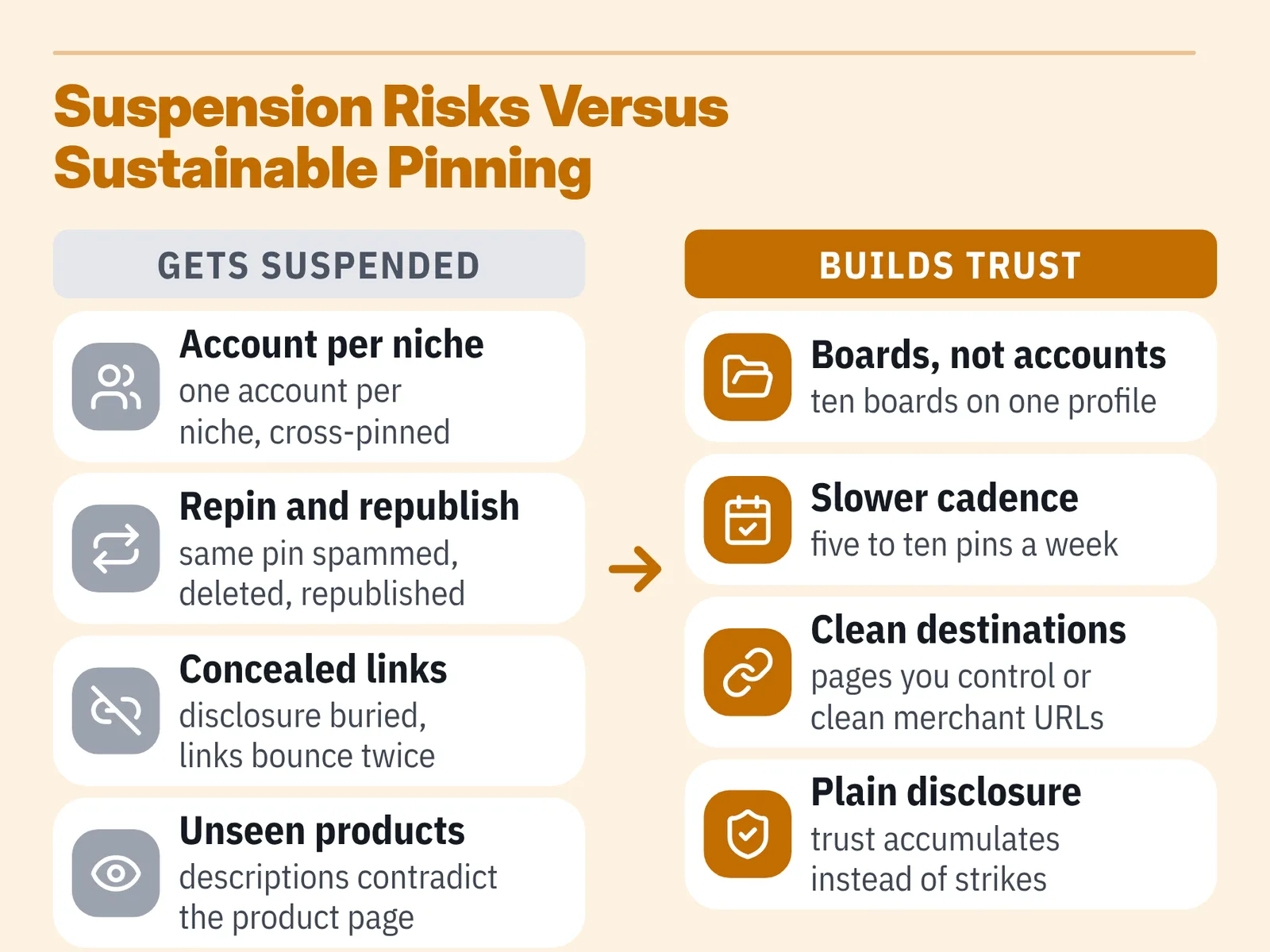
The most common failure is the multi-account strategy. A creator opens one account per niche to "test faster," cross-pins the same images across all of them, and loses the portfolio at once because Pinterest’s guidelines ask creators to keep a single authentic account. Avoid it by using boards, not accounts, to separate topics — ten boards on one profile carry no policy risk.
Other patterns that end badly:
- Repinning the identical image and link dozens of times across boards in a day, which reads as spam.
- Hiding the commercial relationship so the first mention of a commission appears three scrolls down the landing page.
- Pinning a cloaked redirect that bounces through two domains before reaching the merchant.
- Deleting and republishing the same pin repeatedly to chase fresh distribution.
- Promoting products you have never looked at closely, which produces descriptions that contradict the product page.
A slower cadence beats a purge. Publish five to ten original pins a week, link them to pages you control or to clean merchant URLs, disclose plainly, and your account accumulates trust instead of strikes. If a program or traffic method ever feels like it requires concealment, apply the same scrutiny used when checking whether an affiliate offer is legitimate — concealment is the signal, not the solution.
Frequently asked questions
Can you put Amazon affiliate links directly on Pinterest?
Yes, provided the link carries your tracking tag and you disclose it. Amazon’s Associates Program Operating Agreement, as published on Amazon.ae Associates Central, defines a monetizable "Site" to include social media user-generated content, so declare your Pinterest profile in your account and verify the same wording in your own locale’s agreement.
Why does Pinterest block some of my affiliate links?
Usually because of the shortener. Pinterest’s Commercial and Branded Content Guidelines state that Pinterest does not support some link-shortener services and will block a Pin’s link if it uses one, requiring the creator to edit the link. Paste the full destination URL instead.
How should I word the disclosure on an affiliate pin?
Put it at the start of the description where it is visible without expanding the text. Amazon Associates Central tells Associates that a link-level disclosure must be clear and gives "(paid link)", "#ad" or "#CommissionsEarned" as acceptable examples, and US creators must also meet FTC endorsement rules.
Is it worth claiming my website if I only pin affiliate links?
Yes, because it changes what you can measure. The Pinterest Help Center says claiming your website gives you data on how often your content is saved and attaches your profile picture and profile link to Pins saved from your site, which also credits you when readers pin your images.
How many Pinterest accounts should an affiliate run?
One. Pinterest’s Commercial and Branded Content Guidelines tell creators to operate only one Pinterest account, which should be their authentic presence on the platform, so separate your niches with boards rather than duplicate profiles that can all be removed together.
Sources
- Pinterest, Inc. — Form 8-K, Q4 and Full Year 2024 Results Press Release (SEC EDGAR)
- Pinterest, Inc. — Form ARS, FY2025 Annual Report (SEC EDGAR)
- Commercial and Branded Content Guidelines — Pinterest Policy
- Claim your website — Pinterest Help Center
- Why do I have to identify myself as an Associate? — Amazon Associates Central
- Associates Program Operating Agreement — Amazon.ae Associates Central
- Associates Program Policies — Amazon.com Associates Central
Written with AI assistance and fact-checked against the sources cited above before the Amazon Affiliate Editorial Team published it.